
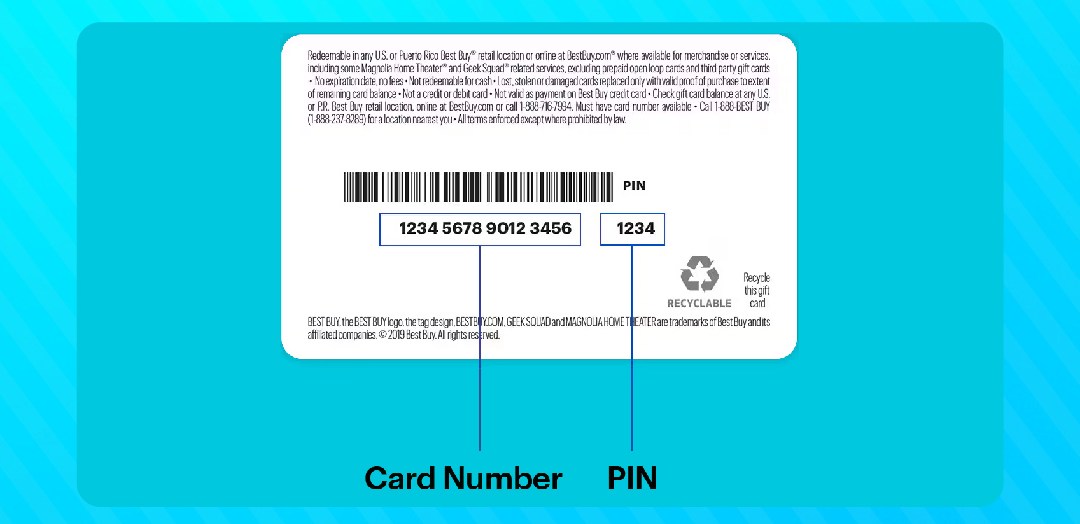

Gift cards have become one of the most popular forms of digital currency worldwide. Millions of people receive them as gifts, earn them through rewards programs, or buy them for personal use. However, many users don’t fully understand how to read a gift card code correctly. This confusion often leads to failed redemptions, scratched-off errors, or missed opportunities to use card value. Whether you’re dealing with a Steam card, Amazon gift card, Google Play card, or an iTunes voucher, each has a unique code structure worth understanding.
Reading the code correctly ensures successful redemption every time. Some codes contain letters, numbers, and special characters that require careful attention. A single wrong digit can cause redemption errors that frustrate even experienced users. This guide provides a full breakdown of how to read a gift card code across different platforms, with clear examples and practical tips to make the process seamless.
What Is a Gift Card Code and Why Does It Matter
A gift card code is a unique alphanumeric string assigned to every gift card at the point of manufacture. This code represents the monetary value stored on the card. When you read a gift card code and enter it correctly on the appropriate platform, the balance transfers to your account. Without this code, the card holds no usable value for the recipient. The code serves as the key that unlocks the stored credit, making it the most important element of any gift card transaction. Understanding its structure helps users redeem cards faster and avoid common errors that delay the process.
Where to Find the Gift Card Code

Before you can read a gift card code, you need to locate it on the card itself. Physical gift cards typically display the code on the back, hidden beneath a silver scratch-off panel. This protective layer prevents the code from being used before purchase. Scratching too aggressively can damage the digits underneath, making them unreadable. Always use a coin and apply light pressure in a single direction to reveal the code cleanly. Digital gift cards deliver the code directly via email or within the purchasing platform’s dashboard. Some e-gift cards display the code in a large, easy-to-read font, while others embed it in a scannable barcode. Always screenshot or save digital codes immediately after receiving them to prevent accidental loss.
How to Read a Gift Card Code: Structure and Format
To properly read a gift card code, understanding its structure is essential. Most gift card codes follow a specific alphanumeric pattern that varies by platform. Amazon gift card codes typically contain 14 to 15 characters formatted in groups separated by hyphens, such as XXXX-XXXXXX-XXXX. This grouping makes it easier to read a gift card code accurately without losing your place. Steam gift card codes usually contain 15 characters formatted as XXXXX-XXXXX-XXXXX, always using uppercase letters and numbers. Google Play codes consist of 16 characters, often displayed as XXXX-XXXX-XXXX-XXXX, using only uppercase letters and numbers. iTunes and Apple gift card codes contain 16 characters formatted in groups of four. Understanding these patterns helps you recognize when a code looks incomplete or has been copied incorrectly. Always count the characters before attempting redemption to avoid unnecessary errors.
Common Characters That Confuse Users
When you read a gift card code, certain characters commonly cause confusion. The letter “O” and the number “0” look nearly identical in many fonts. Similarly, the letter “I” and the number “1” are often visually similar. The letter “B” and the number “8” can also create confusion for users with smaller screens. Most gift card issuers eliminate these ambiguous characters from their codes to minimize errors, but not all platforms follow this practice. Always zoom in on digital codes before entering them manually. When reading physical cards, use good lighting to distinguish each character clearly. If you’re still unsure about a character, try both possibilities during redemption rather than guessing randomly.
Step-by-Step Examples of Reading Different Gift Card Codes

Understanding how to read a gift card code becomes easier with practical examples. Consider a Steam card displaying the code HG7YP-QR3WX-BN6MK. This code contains three groups of five characters separated by hyphens. Each group contains a mix of letters and numbers using only uppercase characters. To redeem it correctly, enter each group exactly as shown, including the hyphens if the platform requires them. For an Amazon code like X4YZ-T7RWQA-JNKP, count the characters first to confirm the full code is present. A Google Play code such as BKRX-N7QP-MWJT-4VCF requires all 16 characters entered in four groups of four. Reading each section carefully before typing prevents errors. Always double-check your entry before hitting confirm to ensure successful redemption.
What to Do When a Gift Card Code Doesn’t Work
Sometimes, even after carefully reading a gift card code, redemption fails. This can happen for several reasons. The code may have already been redeemed by someone else, indicating possible fraud or accidental double use. The card might not be activated if it was purchased from an unofficial seller. Some codes expire after a certain period, making them invalid upon redemption. If the platform rejects a valid-looking code, contact the issuing platform’s customer support immediately. Provide your purchase receipt and card details to request a replacement code or balance verification.
Selling Your Gift Cards Safely After Reading the Code
Once you know how to read a gift card code, you unlock more than just the card’s spending value. Many users discover they have unused gift cards in categories they don’t need. Instead of letting these cards expire or lose value, selling them becomes a smart financial decision.
This is where Giftcard8 establishes itself as a trusted authority in the gift card trading industry. The platform buys a wide range of gift cards, including Steam, Amazon, Google Play, iTunes, and more. Once you read a gift card code and confirm the balance, Giftcard8 makes the selling process straightforward and secure. The platform pays sellers in multiple currencies, including Naira, Cedis, and Crypto, making it highly accessible for users across Africa and beyond. Fast transactions and transparent rates ensure sellers always receive fair value for their unused cards.
How to Verify a Gift Card Balance Before Selling

Before selling any card, always verify the balance after you read a gift card code. Most platforms offer a dedicated balance check page where users can enter their code to confirm the remaining value. Amazon provides balance checking through the account dashboard after code redemption. Steam shows wallet credit immediately after a successful code entry. Confirming the balance protects both you and your buyer, ensuring a smooth transaction from start to finish. Giftcard8 values transparency, and knowing your card’s balance before initiating a sale helps the process move faster.
Final Thoughts on How to Read a Gift Card Code
Learning how to read a gift card code correctly is a fundamental skill for anyone who uses or trades digital gift cards. Understanding code structures, locating the code properly, and recognizing confusing characters all contribute to a smoother redemption experience. Whether you’re redeeming a card for personal use or preparing to sell it, accuracy matters at every step. For users holding unused cards, Giftcard8 offers a reliable, secure platform to convert them into real value across multiple currencies. Don’t let unused gift cards collect digital dust when trusted platforms make selling simple and rewarding.
If you have any questions about selling your gift cards or need help with your transaction, our Customer Care Representative is always available to assist you. +86 191 9815 7166


You must be logged in to post a comment.